
Create
Choose a ticketed or RSVP event, set dates and time zone, then add the location and organizer.
Build ticketed or RSVP events, publish branded event pages, manage tickets and registrations, check in guests and automate the attendee journey—all in the same platform that holds your contacts, conversations, payments and follow-up.

Lead Connector Events is an event-management workspace for creating public event pages, accepting free RSVPs or ticket registrations, managing schedules and speakers, collecting eligible payments, tracking attendees and checking people in. Because event activity lives beside CRM contacts and workflows, registration can become the beginning of a measurable customer journey—not an isolated spreadsheet or third-party attendee list.
One connected system
A separate event platform often creates duplicate contacts, manual exports, delayed sales follow-up and incomplete attribution. Lead Connector connects the public event experience with the customer record, communications, payments, automation and team actions your business already uses.
Choose a ticketed or RSVP event, set dates and time zone, then add the location and organizer.
Design a public page with event details, tickets, schedule, speakers, location, host and FAQs.
Offer free or paid ticket types, quantities, sale windows, custom checkout fields and eligible coupon codes.
Send confirmations and reminders while giving online attendees controlled access to joining information.
Track registrations and revenue, manually add eligible attendees and scan QR codes at the venue.
Use registration and check-in activity to trigger CRM tasks, messages, opportunities and post-event journeys.
Run paid conferences, VIP experiences, workshops and concerts, or use RSVP for free webinars, open houses, meetups and internal events.
Create multiple free or fixed-price ticket tiers, set inventory and sale periods, and use percentage coupons with dates and redemption limits.
Build sessions inside the event window, assign speakers, locations or stages, and publish a useful attendee agenda.
Customize event details, checkout fields, terms, colors and typography; review mobile and desktop previews before publishing.
Set deadlines and total capacity, review registrations and refunds, add attendees manually and keep ticket inventory current.
Use QR scanning for eligible in-person registrations and choose which payment statuses can enter.
Event registration and check-in can become workflow triggers. Event-relative waits help time communication before, at or after the actual event date, while event and ticket data can guide conditional branches.
Capture a lead from a form or eligible ad source, qualify the contact and register the person for the correct RSVP or ticketed experience.
Send confirmation, add an event or ticket tag, notify the owner and create an opportunity or preparation task.
Wait relative to the event date, then send practical reminders, venue instructions or the online access path.
Trigger a welcome message, alert the host, provide resources or mark the attendee for a relevant on-site journey.
Send a thank-you, survey, replay or offer; create a sales task; and separate attendees from people who did not check in.
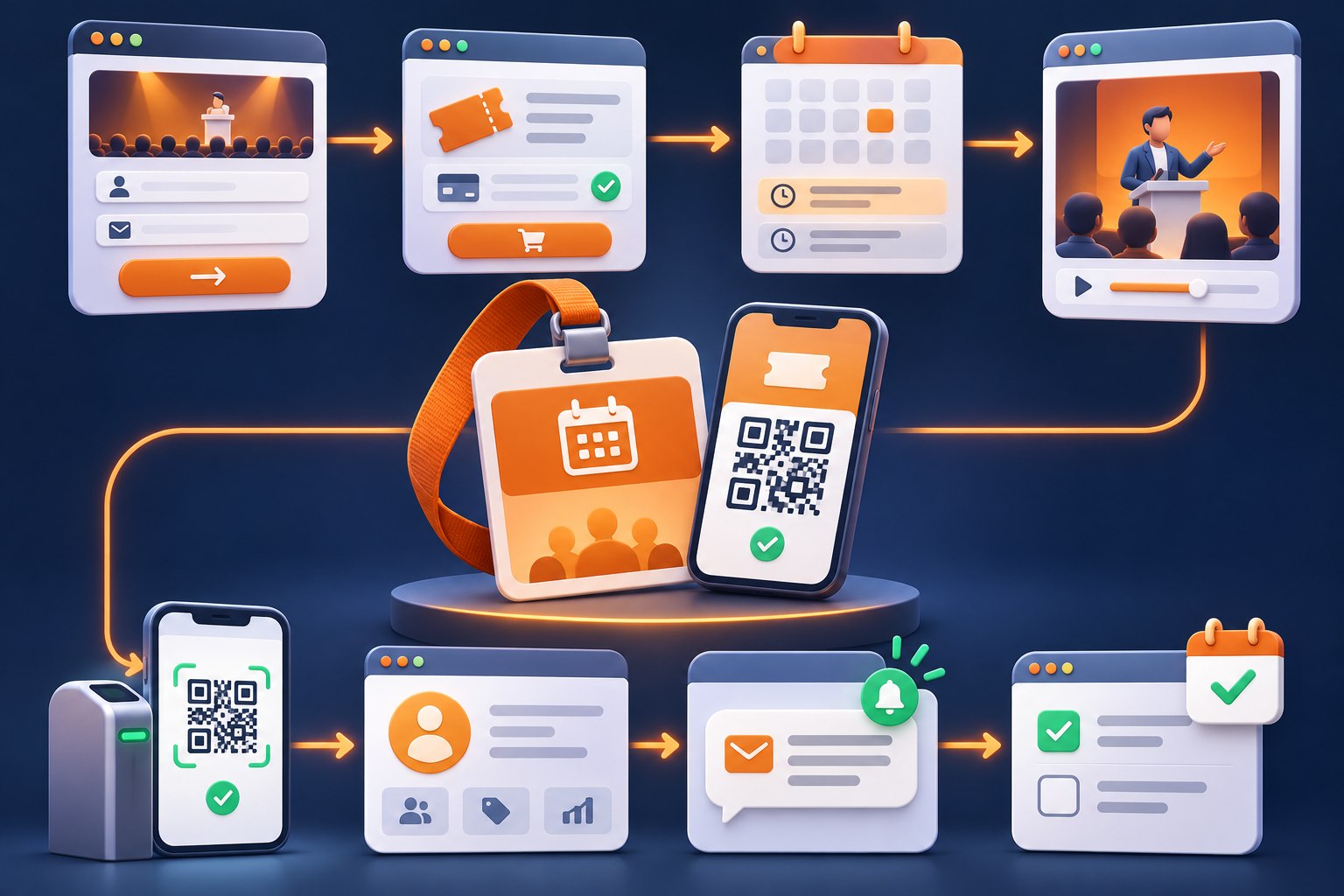
The value is not only selling a ticket. It is preserving who registered, what they selected, whether they attended and what should happen next—without rebuilding that context in another system.
Sell conference, summit or workshop tickets, publish speakers and sessions, scan attendees and route qualified participants into sales follow-up.
Run paid challenges, seminars, retreats, open days and free introductory sessions connected to member communication and offers.
Manage public education sessions, seminars and appropriate webinars while applying the organization’s privacy, consent and regulatory requirements.
Promote workshops, masterclasses and cohort events with schedules, speakers, registration and post-session learning journeys.
Create repeatable event operations for client businesses while keeping each event’s contacts, ticket activity and follow-up organized.
Coordinate free or paid gatherings, fundraising events and member experiences with reminders and attendance visibility.
Use for public-facing ticketed or RSVP experiences that need a registration page, tickets, schedules, speakers, attendee tracking or QR check-in.
Use for bookable shared schedules where availability belongs to the event rather than a specific host.
Use for experiences delivered inside a Lead Connector Community to a defined member audience.
Use for live presentation or meeting delivery, then connect the appropriate event or registration journey around it.
Yes. Use RSVP for free registration, or Ticketed events for free and fixed-price ticket tiers. Confirm current payment-provider and account availability before launch.
Yes. In-person events can show an address, map and directions. Online events can provide joining instructions and control when the meeting link is visible.
Yes. Event registration and check-in can trigger workflows, and event-relative waits can schedule communication before, at or after the event date.
Yes. QR check-in can be enabled for eligible in-person registrations, with allowed entry based on configured payment status.
Events are designed for public ticketed or RSVP experiences with event pages and attendee management. Event Calendars are bookable schedules that do not require an assigned host.
Discover how Lead Connector can help you with every aspect of your business
Create the event, capture the attendee, automate communication and give your team a clear next step after the event.
Choose your plan