Paid Lead Management: Capture, Assign, Follow Up and Retarget Every Lead
Learn how to capture leads from every paid advertising source, replace manual Excel tracking, automate assignment and follow-up, and reactivate eligible leads with CRM.
Paid Lead Management: Capture, Assign, Follow Up and Retarget Every Lead
Businesses can spend thousands on Google, Meta, TikTok, LinkedIn and other advertising campaigns, collect hundreds of enquiries, and still lose revenue after the form is submitted.
The problem is rarely a lack of leads. It is what happens next.
Someone downloads a CSV. Another employee copies names into Excel. Leads are divided manually between salespeople. Notes remain in personal phones or separate messaging accounts. Follow-up depends on memory, and management cannot see which leads were contacted, which need another conversation, or which campaign produced actual sales.
That process turns paid advertising into an expensive list-building exercise. A connected CRM changes it into a measurable sales system.
> You paid for the lead. Do not lose it in a spreadsheet.
What Is Paid Lead Management?
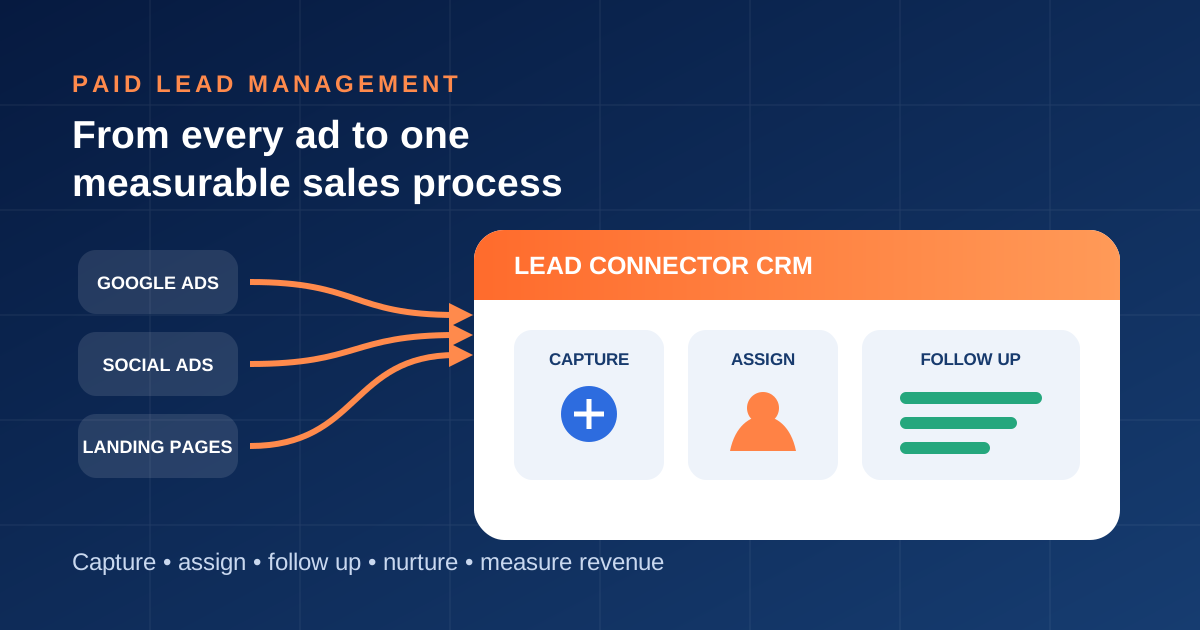
Paid lead management is the process of capturing, assigning, contacting, qualifying, nurturing and measuring enquiries generated by advertising.
These enquiries can originate from:
- Google Ads lead forms, search campaigns and landing pages
- Meta lead ads on Facebook and Instagram
- TikTok lead generation campaigns
- LinkedIn Lead Gen Forms
- YouTube, display and retargeting campaigns
- Click-to-call or click-to-message advertisements
- WhatsApp advertising entry points
- Industry marketplaces and directory advertising
- Sponsored webinars, downloads and event registrations
- Any paid campaign that sends visitors to a website form, chat or booking page
A good system preserves the original source, campaign and available tracking information while giving every lead an owner, status, conversation history and next action.
Why Paid Leads Get Lost After They Arrive
Manual exports create delays
Lead quality can decline while a spreadsheet waits to be downloaded, cleaned and shared. Even a promising enquiry may contact another provider before an employee opens the file.
Excel stores rows, not responsibility
A spreadsheet can record a name and status, but it does not reliably manage ownership, response targets, conversations, tasks, escalation, opt-outs or automated stop conditions.
Manual distribution is inconsistent
One representative may receive too many leads while another has capacity. Leads may be assigned to the wrong branch, language, territory or service. Some may remain unassigned entirely.
Notes become fragmented
Call notes may be in Excel, messages in WhatsApp, emails in an inbox and appointments in a calendar. The next employee cannot see the complete relationship.
There is no defined follow-up strategy
Many teams call once and mark the lead as unresponsive. Others send repeated messages without context. Neither approach creates a useful customer experience.
Marketing optimizes for the wrong result
Advertising dashboards show form submissions or platform leads. Without CRM outcomes, the company cannot distinguish campaigns that create revenue from campaigns that create low-intent records.
Manual Lead Handling vs a Connected CRM
| Process | Spreadsheet workflow | Lead Connector workflow |
|---|---|---|
| Lead capture | Exported or copied manually | Captured from supported sources and integrations |
| Attribution | Often reduced to a typed source | Campaign and source fields retained when available |
| Assignment | Manager divides rows | Rules route by location, service, language or round robin |
| First response | Depends on employee availability | Immediate acknowledgement plus owner notification |
| Notes | Split between cells and personal apps | Stored beside the contact and conversation history |
| Follow-up | Calendar reminders or memory | Tasks and workflows based on status and customer action |
| Visibility | Static file and inconsistent updates | Live ownership, pipeline stage and overdue actions |
| Nurture | Periodic list exports | Segments built from consent, interest and lifecycle data |
| Measurement | Cost per lead | Contact, booking, pipeline, sale and revenue by source |
The Ideal Paid-Lead Workflow
1. Capture the lead automatically
Connect each supported advertising source, landing page, form, phone number and messaging entry point to the CRM. Create or update the customer record without requiring an employee to copy the information.
Record useful context when available:
- Original source and campaign
- Advertisement or landing-page identifier
- Requested product or service
- Location and preferred language
- Submission date and time
- Consent and permitted communication channels
- Qualification answers
Use consistent campaign names and tracking parameters. Test the entire journey before launching a campaign, including redirects, duplicate contacts and mobile submissions.
2. Deduplicate before creating unnecessary records
The same person may submit more than one form, send a WhatsApp message and call the business. Matching supported identifiers helps the team work from one customer history rather than contacting duplicate records as if they were different people.
Duplicate handling should never erase meaningful source history or consent changes. Define which fields are preserved and which event represents the most recent intent.
3. Assign every lead using clear rules
Lead routing can consider:
- Geographic territory or nearest branch
- Requested service or product
- Preferred language
- Campaign or lead type
- Representative availability or workload
- Existing customer owner
- Round-robin distribution
- Lead value or qualification score
Every record should have one accountable owner. If assignment fails, route the lead to an exception queue and alert a manager instead of leaving it invisible.
4. Respond immediately without pretending automation is human
An immediate acknowledgement confirms that the enquiry was received and explains what happens next. It can provide a booking link, ask one useful qualification question or state when a team member will respond.
Use the channel the person selected and follow applicable consent, platform and quiet-hour rules. Automation should stop or change when the lead replies, books, opts out, is disqualified or becomes a customer.
5. Give the salesperson complete context
The assigned employee should see the advertisement source, request, form answers, previous conversations, tasks and current pipeline stage before contacting the lead. This prevents repetitive questions and makes the first human interaction more relevant.
Lead Connector can bring supported conversations into a unified inbox so employees can work with the CRM record instead of searching disconnected apps.
6. Use a visible pipeline
A practical paid-lead pipeline might include:
- New lead
- Assigned
- Contact attempted
- Conversation started
- Qualified
- Appointment booked
- Proposal or estimate sent
- Decision pending
- Won
- Lost or nurture
Each stage needs an entry rule, owner expectation and exit condition. “Follow up” should not become a permanent holding stage. See the complete guide to building a sales process.
7. Follow up according to intent
One sequence should not treat every lead the same. Segment follow-up by urgency, service, qualification, channel and action.
A simple structure can include:
- Immediately: confirm receipt and notify the owner
- Same business period: personal call or message with the relevant context
- Next follow-up: answer a common question or offer a specific next step
- Later follow-up: provide proof, guidance, an appointment option or decision deadline
- Longer-term nurture: move eligible, consented contacts into a useful campaign rather than repeatedly asking whether they are ready
Read how to automate lead follow-up without sounding robotic for timing, personalization and stop conditions.
8. Escalate leads at risk
Dashboards and alerts should surface:
- New leads without an owner
- Leads not contacted within the response target
- Conversations waiting for a reply from the business
- Appointments not confirmed
- Proposals without a next action
- High-value opportunities that stopped moving
- Workflow or integration failures
Managers should manage exceptions, not manually inspect every spreadsheet row.
How to Retarget and Reactivate Leads You Already Paid For
An enquiry that does not buy immediately is not automatically worthless. The business has already paid to create that relationship, but future communication must remain relevant and compliant.
Segment the database
Useful segments may include:
- Qualified leads who did not book
- Booked leads who did not attend
- Proposal recipients who did not decide
- Leads interested in a specific service
- Lost opportunities with a future timing reason
- Former customers eligible for a related or repeat service
- Contacts who engaged recently but did not convert
Do not treat an old database as unrestricted permission. Respect consent, unsubscribe requests, channel policies, privacy requirements and local law.
Run relevant CRM campaigns
Eligible contacts can receive educational content, useful reminders, new service announcements, event invitations or a genuinely relevant offer. Campaigns should use CRM fields and lifecycle status rather than blasting the same promotion to everyone.
Build advertising audiences where supported
Depending on the advertising platform, integration and applicable rules, eligible first-party customer data may help build custom or suppression audiences. Availability and matching vary. Keep consent, platform terms and data-protection obligations central to the design.
Reactivate instead of reacquiring
Before paying to reach only new people, test a controlled lead-reactivation campaign for suitable older contacts. Measure replies, bookings, qualified opportunities, sales, opt-outs and complaints.
Measure Revenue, Not Just Lead Volume
A complete dashboard should connect advertising activity to business outcomes:
- Cost per captured lead
- Valid and duplicate lead rate
- Speed to first useful response
- Assignment success and unassigned leads
- Contact and reply rate
- Qualification rate
- Appointment booking and attendance
- Proposal or estimate rate
- Sales conversion rate
- Revenue and pipeline value by source and campaign
- Cost per qualified opportunity and customer
- Reactivation revenue
- Opt-out and complaint rate
A campaign with fewer leads may be more profitable if those leads respond, qualify and purchase. Learn how to track which ads generate sales.
How Lead Connector Solves the Paid-Lead Problem
Lead Connector provides a connected system for turning advertising enquiries into accountable sales opportunities. Businesses can use it to:
- Capture leads from supported forms, websites, landing pages, advertisements and communication channels
- Maintain structured contact records and source information
- Assign leads using routing and workflow rules
- Notify employees and create follow-up tasks
- Communicate through supported WhatsApp, SMS, email, calling, chat and social channels
- Manage opportunities in visual sales pipelines
- Offer appointment booking and send reminders
- Automate useful follow-up with human takeover and stop conditions
- Segment existing contacts for permitted campaigns
- Track team activity, opportunity progress and business outcomes
The result is not simply a better database. It is a controlled process in which every paid lead has context, ownership and a measurable next step.
Implementation Checklist
- [ ] List every paid lead source and destination
- [ ] Standardize campaign and source naming
- [ ] Connect supported sources to the CRM
- [ ] Define duplicate-handling rules
- [ ] Create routing rules and an assignment-failure queue
- [ ] Set response-time targets by source and operating hours
- [ ] Build a short, contextual follow-up workflow
- [ ] Define pipeline stages and required next actions
- [ ] Add stop conditions, consent and opt-out handling
- [ ] Create dashboards for response, conversion and revenue
- [ ] Segment older leads by intent and eligibility
- [ ] Test every branch before increasing advertising spend
Frequently Asked Questions
What is the best way to manage leads from advertising?
Capture them directly into a CRM that preserves source context, assigns an owner, records every interaction and creates the next action. Avoid relying on periodic spreadsheet exports for active sales follow-up.
Can a CRM automatically assign advertising leads?
Yes. Depending on configuration and available data, rules can route leads by territory, service, language, existing ownership, workload or round robin. Include a fallback for records that cannot be assigned.
How quickly should paid leads be contacted?
As quickly as the business can provide a useful and honest response. Set targets appropriate to operating hours, customer expectations and the service. An automated acknowledgement is useful, but it does not replace a necessary human conversation.
Can we market to leads who did not buy?
Only when the communication is permitted and relevant. Use recorded consent, preferences, opt-outs, platform rules and applicable privacy and marketing law. Segment by interest and lifecycle instead of sending every contact the same campaign.
Should Excel still be used?
Excel remains useful for analysis and one-time reporting. It becomes risky as the operating system for live leads because it lacks reliable ownership, conversations, workflow, automation and lifecycle controls. Compare Excel vs CRM.
Stop Paying for Leads Your Process Cannot Protect
Advertising does not end when somebody completes a form. That moment begins the sales process.
With Lead Connector, businesses can replace manual lists and scattered notes with automatic capture, intelligent assignment, structured follow-up, connected conversations, measurable pipelines and responsible reactivation.
Explore Lead Connector lead management or contact our team to build a process that protects every advertising opportunity.